If you’ve been using ChatGPT, Gemini, Copilot, or another AI chatbot, you’ve probably noticed something. Sometimes the results are great. Sometimes they’re not quite what you had in mind. Although the difference is sometimes the tool or the model you are using, there are small tweaks you can make to your approach to using chatbots that can have a big impact.
When I first started sharing chatbot strategies with educators a few years ago, for many people joining a webinar or workshop it was their first time exploring Generative AI. Now many of the educators I work with are looking to push things a bit further and are searching for ways to make the most of chatbots. A few small shifts in how you interact with a chatbot that make a significant difference in your output.
Whether you’re brand new to chatbots or you’ve been using them for a while, these AI chatbot tips for teachers will help you work smarter and save more time!
Why Your First Prompt Is Just the Beginning
There are lots of different ways to interact with a chatbot and if you’ve joined me for a workshop or webinar you know I love sharing strategies and giving participants time to “choose their own adventure.” When jumping into a chatbot for the first time, you might simply ask a question, get an answer.
As you spend more time in these tools, you figure out that you’ll get a much better result if you give some context. Instead of a super simple question or task, you might share some background information. For example, if you’re asking for help creating a lesson, you can add more context like grade level, your students’ needs, the format you prefer, or even the standards you’re targeting. The more context you provide upfront, the less refining you’ll need to do afterward.
Over time you might go a bit further than a simple or more complex prompt. You can start to build a conversation, or go back and forth with a chatbot. Instead of using a chatbot like a search engine, you treat it like a collaborative partner. You go back and forth refining, adding details, asking follow-up questions, until you have something that’s actually useful. Instead of getting an output that is just okay, you end up with an output that’s closer to 80-90% of the way to what you need.
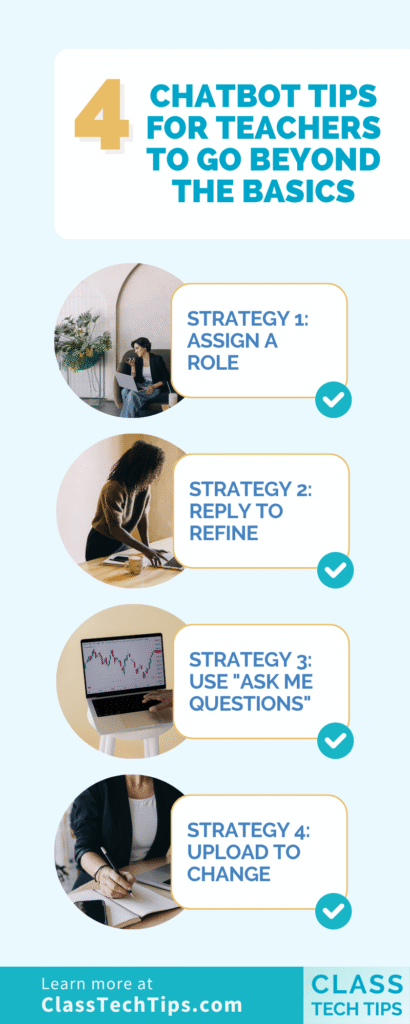
Let’s Go Beyond the Basics: 4 AI Chatbot Tips for Teachers
Let’s take a look at a few strategies you can try out with your favorite chatbot!
Strategy 1: Assign a Role
One of the simplest ways to improve your chatbot results is to tell it who you want it to be. You’re essentially giving a chatbot a role. This gives the chatbot context about the perspective and expertise it should bring to its response.
You can keep it simple. “I’m creating this lesson for a group of 10th graders” gives the chatbot enough context to adjust reading level and complexity.
Or you can be more specific. “Act as an experienced 3rd grade reading specialist. Help me create guided reading questions for this passage.” That extra detail means the chatbot will focus on comprehension strategies and vocabulary. It will suggest the kinds of scaffolding questions a reading specialist might actually ask.
Strategy 2: Reply to Refine
This is the strategy I come back to more than any other. Think of the first prompt you give a chatbot as a rough draft. It doesn’t have to be perfect, instead it can act as the start of a conversation.
After you get your first response, you “reply to refine.” You might say:
- “This is great, but make it shorter.”
- “Add discussion questions after each section.”
- “Rewrite this with simpler vocabulary.”
- “The tone is too formal. Make it warmer and more conversational.”
- “Add a row to the rubric for citations.”
Each reply pushes the output closer to what you actually need. You’ll likely find that the second or third response is almost always better than the first. The chatbot now has context from your conversation and it understands your preferences, your constraints, and your goals.
Strategy 3: Use the “Ask Me Questions” Technique
You might remember this strategy from an April post on the blog about using AI to help with newsletter drafting. It’s a powerful strategy that you can use in a variety of contexts. When you’re not sure how to describe what you want to a chatbot, let the chatbot ask you questions instead.
Here’s how it works. Structure your prompt with a phrase like: “I need help creating [whatever you’re working on]. Ask me questions to help.”
The chatbot will respond with a series of targeted questions about your grade level, audience, and preferences. Then you just answer them. This is where the microphone or dictation feature comes in handy. Instead of typing detailed responses, you can talk through your answers.
What makes this technique so effective is that it solves the “blank page” problem. You don’t need to know the perfect prompt. Just start the conversation. The chatbot will guide you through the details it needs. It’s not perfect of course, but it will certainly help get your wheels spinning. This strategy is perfect for when you know what you want but struggle to describe it all at once.
Strategy 4: Upload to Change
Most chatbots let you upload files like PDFs, images, documents, and spreadsheets. Then you can ask the AI to do something with that content. This is a massive time saver when you already have a resource and want to transform it into something a little different.
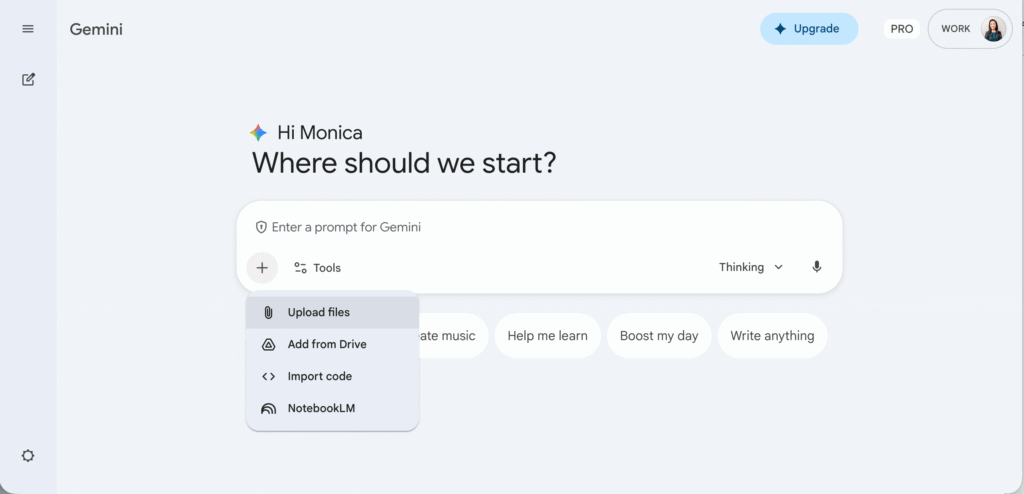
Here are some examples of how teachers are using this:
- Upload a PDF of a slide deck you’ve made and ask for a study guide.
- Upload a lesson plan and ask the chatbot to restructure it into a different format (like a table or list).
- Upload a rubric and ask for a version with more student-friendly language.
In a webinar I hosted this spring, I demonstrated this live for participants by uploading a pretty detailed lesson plan about animal adaptations. I asked Gemini to turn it into a study guide. Within a minute, I had a well-structured study guide based on the lesson content. It captured the key concepts and the vocabulary. Even though it wasn’t absolutely perfect, it made something that needed just a few tweaks instead of me needing to start from scratch.
In Gemini, you can add files directly from Google Drive. This makes it even faster if your materials are already saved there.
Using AI for a Head Start
When I think about using AI to support a teacher’s workflow, I think of it as a head start. A year or two ago, I would have said AI gets you about 70–80% of the way there. Your expertise fills in the rest. Today, with stronger models and more teachers generally having a bit more experience using chatbots, that number is closer to 80–90%.
It’s exciting for sure, but it also comes with an important reminder. It can be tempting to just copy and paste the output when it looks close to finished. But keeping yourself in the loop matters. Reviewing, editing, and making sure the output fits your specific students is absolutely essential.
I like to think of it this way. AI handles the heavy lifting of formatting, structuring, and drafting. Your expertise shines in the final product. You review the content you created with a chatbot and make decisions like, “My students need this explained differently.” Or, “I want to connect this to what we learned last week.”
I’d love to hear which of these AI chatbot tips for teachers is making the biggest impact in your workflow. Use the box below to get on my newsletter list and then reply to my email with your thoughts, ideas, and questions!